linepay

bolttech customers can use LINE Pay as a payment channel on bolttech.co.th

LINE Pay is a payment channel where users can link up their credit cards and/or bank accounts to easily pay for products and services.

Using LINE Pay on bolttech (Desktop)

  • Choose LINE Pay as a payment
  • Log in to your LINE Pay account or use LINE application to scan QR Code on the screen
  • Confirm transaction information on mobile device
  • Input 7 digit passcode
  • Final confirmation for transaction on both desktop and mobile devices
  • Wait for the policy to arrive or continue to enjoy the convenience of buying car insurance with bolttech

Using LINE Pay on bolttech (Mobile)

  • Choose LINE Pay as a payment
  • LINE Pay will automatically launch on mobile devices
  • Confirm transaction information on mobile device
  • Input 7 digit passcode
  • Wait for the policy to be delivered or continue to enjoy the convenience of buying car insurance with bolttech

Applying for LINE Pay:

  • Open LINE Application on your mobile device
  • Select “More” function
  • Select “LINE Pay” service
  • Create an account and passcode
  • Add a credit/debit card or bank account
  • Get ready for shopping online!
2c2p

We allow our customers to directly pay for their policy at their ATM or at they favorite bank/store.
Once our user checks out on bolttech.co.th, he/she will receive a receipt with a reference number and a bar code with different instructions.
It can be printed, uploaded to a smartphone, or written down. The receipt should be given to the payment counter staff, or scanned by the customer at an enabled ATM, and the correct amount should be paid.

We support ATM/counter payment for the following banks:

  • Siam Commercial Bank
  • Bank of Ayutthaya
  • TMB Bank
  • UOB Bank
  • CIMB Bank

We also support counter payment for the following stores:

  • TrueMoney
  • Tesco
  • Just Pay
  • Mpay
  • Pay at Post
  • FamilyMart
  • Big C
  • CenPay
  • Central Food Hall
  • Tops
  • B2S
  • Robinson
  • Central
Bank transfer/deposit

Bank Transfer/Deposit

We support direct bank transfers/deposits. At check-out please select bank transfer or bank deposit as your method of payment. After completing the checkout process you will be given details for the bank transfer/deposit. Please note that you will not be insured in case of any accident or claim until you have completed payment. You have 7 days to complete the purchase of your policy before the policy becomes invalid. After receiving the payment we will send a confirmation email to confirm we have received payment and your policy has been activated.

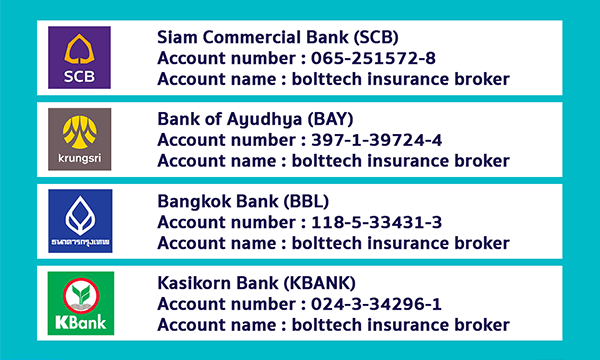
If you want to pay by bank transfer/deposit, please make sure to make a payment to: Account name:   Bolttech Insurance Broker (Thailand)

Then, take a picture of the frontside slip and send the picture to  support@bolttech.co.th

โอนเงินผ่านธนาคาร

visa/mastercard

Credit Card/Debit Card

We support all major payment cards. We use the latest security technology to protect your information and be secure in the knowledge your data is protected. If you would like more information regarding security online you can visit our security and privacy page.

installment

Credit Card Installment

Paying by credit card installments can be a great way to spread your expenses, rather than paying your whole premium in one lump sum. At bolttech, we offer you 0% interest plans from 10 banking partners.  Learn more about our installment programme and check whether you qualify.

PromptPay Payment

PromptPay Payment

PromptPay is a convenient and fast payment method for Internet banking or ATM transfers from your PromptPay-enabled account for the lowest transaction fees. To transfer:

  • Login to your mobile account, internet banking, or select ATMs, and use PromptPay money transfer from the machine
  • Scan your QR code or input the tax ID from bolttech in your mobile PromptPay account
  • Select money transfer for the PromptPay service
  • Fill in the amount to be transferred
  • Save your transaction slip
  • Send your transaction slip to bolttech via e-mail or LINE@ and our customer service will call back to confirm your car details so you can wait at home and receive your insurance

Read more about PromptPay service here.

PayPal

PayPal (soon)

We offer full integration with PayPal to support this method of payment. Many people find using Paypal highly convenient and secure. To pay with Paypal you need to have a PayPal account.