QR Code Payment
Customers can pay conveniently and quickly by QR CODE payment.
1. Choose an insurance policy you would like to purchase.
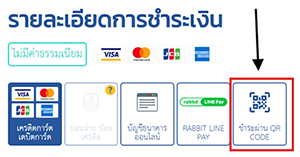
2. Choose QR CODE Payment.
![qr-code]()
3. Click to click to "Buy iT Now". The system will generate QR CODE to you.
4. Open the bank application where you will process the payment. And choose to scan the QR Code
5. Perform payment according to the bank's system. And don't close the browser where you bought insurance.
6. After payment has been completed. Wait for the policy number from the browser where you bought the insurance.
Need help? contact us by calling 02-106-5810 (9 am - 9 pm : Mon - Fri) or email: support@bolttech.co.th